轉載自http://cha.homeip.net/blog/
L7-filter 安裝實錄
L7-filter (Application Layer Packet Classifier for Linux), 是 Linux netfilter 的外掛模組, 它能讓 Linux 的 iptables 支援 Layer 7 (Application 應用層) 封包過濾功能, 限制 P2P、即時通訊等使用動態埠口的網路軟體.
以下是在 Fedora Core 3 的安裝過程:
下載 Layer 7 Patches & Protocol definitions
下載點:
http://sourceforge.net/project/showfiles.php?group_id=80085
(Ref: http://l7-filter.sourceforge.net/HOWTO#Get)分別下載並解包至 /usr/local/src, 本篇以 l7-protocols-2005-12-16 和 netfilter-layer7-v2.0 為例
先安裝 Layer 7 Protocol definitions:
cd /usr/local/src/l7-protocols-2005-12-16
make install
安裝 kernel source
依需求選擇下載點:
- http://www.kernel.org/pub/linux/kernel/ (Linux kernel source 官方下載點)
- ftp://ftp.isu.edu.tw/pub/Linux/Fedora/linux/core/3/SRPMS/ (FC3 原始核心原碼下載)
- ftp://ftp.isu.edu.tw/pub/Linux/Fedora/linux/core/updates/3/SRPMS/ (FC3 新版核心原碼下載)
Fedora Core 系列 kernel.src.rpm 操作備忘:
wget ftp://ftp.isu.edu.tw/pub/Linux/Fedora/linux/core/3/SRPMS/kernel-2.6.9-1.667.src.rpm
rpm -ivh kernel-2.6.9-1.667.src.rpm
cd /usr/src
tar -jxf ./redhat/SOURCES/linux-2.6.9.tar.bz2
ln -s linux-2.6.9 linux
重新編譯、安裝 Layer 7 Patches 更新過的 kernel source
cd /usr/src/linux
patch -p1 < /usr/local/src/netfilter-layer7-v2.0/kernel-2.6.13-2.6.14-layer7-2.0.patch (選用與核心版本對應的 patch 檔)
make oldconfig (如果之前已經有編譯過 kernel source, 需先執行 make mrproper)重點: Layer 7 match support (EXPERIMENTAL)... [N/m/?] (NEW) -> m
(亦可全部按 Enter 接受預設值, 再 make menuconfig 進行調整)
make menuconfig (若需進一步設定 kernel config 才執行; make menuconfig 需求套件: ncurses-devel)
重點 (以 kernel 2.6.13 為例, 不同的核心版本排列方式不一定相同):
Code maturity level options --> [*] Prompt for development and/or incomplete code/drivers
Networking --> Networking options -->
[*] Network packet filtering (replaces ipchains) -->
IP: Netfilter Configuration -->
Connection tracking (required for masq/NAT)
[*] Connection tracking flow accounting
IP tables support (required for filtering/masq/NAT)
Layer 7 match support make bzImage (kernel 2.4 需先執行 make dep)
make modules
make modules_install
make install
安裝 Layer 7 Patches 更新過的 iptables
至 http://netfilter.org/ 下載 iptables source
解包至 /usr/local/src, 本篇以 iptables-1.3.4 為例
cd /usr/local/src/iptables-1.3.4
patch -p1 < ../netfilter-layer7-v2.0/iptables-layer7-2.0.patch
chmod +x ./extensions/.layer7-test
make KERNEL_DIR=/usr/src/linux
make install KERNEL_DIR=/usr/src/linux若原本已安裝 iptables 套件的處理
cd /sbin
mv iptables iptables.old
ln -s /usr/local/sbin/iptables iptableschkconfig iptables on
vi /boot/grub/menu.lst (改成預設以新的 kernel 開機)
reboot
使用 iptables layer-7 filter
iptables -t mangle -A PREROUTING -m layer7 --l7proto yahoo -j DROP (禁止 Yahoo! Messenger 封包)
L7-filter 支援的所有通訊協定: L7-filter Supported Protocols
亦可使用 -j MARK 參數搭配 QoS 頻寬管理, 詳情可參考: cbq.init 設定手札
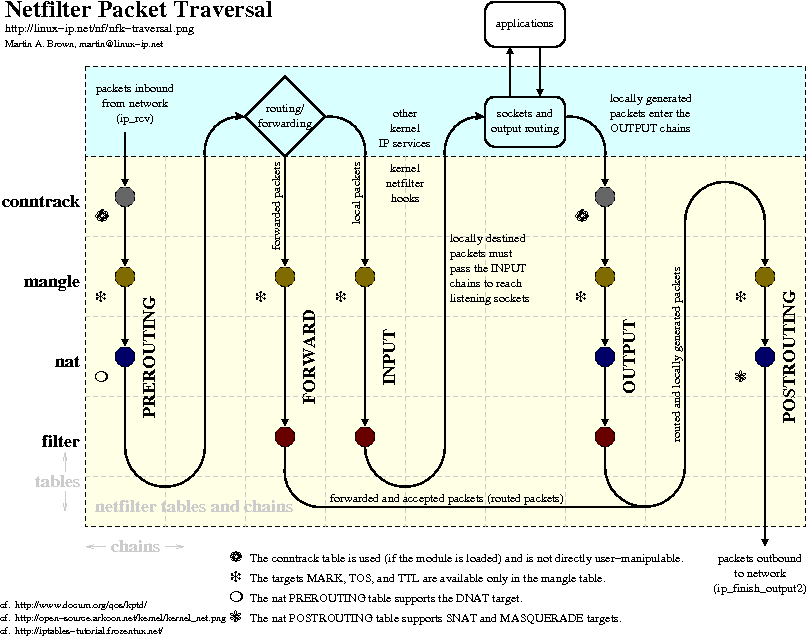
iptables 封包過濾圖: http://linux-ip.net/nf/nfk-traversal.png
後記 1. - make oldconfig 的奧秘
make oldconfig 會比對舊的 kernel config, 帶入先前的設定值來產生新的 kernel config, 這樣就不用在 make menuconfig 的時候改太多設定. 舊的 kernel config 通常可以在這兩個地方找到:
- /boot/config-2.x.x-x
- /usr/src/linux/.config (如果這個 kernel source 之前有編譯過的話)
後記 2. - Trustix 2.2 安裝備忘
以 swup 安裝 kernel source 需先修改 swup 設定檔:
vi /etc/swup/swup.conf --> 註解 exclude_pkg_regexp = "kernel.*"
swup --install kernel-source經前述程序安裝完成後, iptables 使用 layer7 參數時會出現錯誤訊息:
iptables v1.3.4: Couldn't load match `layer7':/usr/local/lib/iptables/libipt_layer7.so: undefined symbol: __guard
任何版本的 iptables 都會出現相同的錯誤訊息, 目前尚未找出解決辦法...
參考資料:

沒有留言:
張貼留言